NETKEEPERTM
NETKEEPERTM

Know which app is using your shared Wi-Fi data, before it runs out.

NETKEEPER is a free widget for Windows and Android. It shows your daily allowance live, ranks the apps using it, and warns you early. Built for crews on shared offshore Wi-Fi.

Free. No account, no server, no tracking. Everything stays on your device.

NETKEEPER™ON TOP
↓ 0 B/s↑ 0 B/s
5 min 15 min 1 hour
LAST 60 MIN (per minute)
Since 06:00 1.09 GB / 3.0 GB
resets 06:00
APPS - LAST 5 MIN

A working demo with sample numbers. Try pressing End on an app. Real screenshots are below.

Six ways to look at your data

Start with the widget. Open it up when you want the full picture, shrink it when you just want a glance. Everything below is a real screenshot from a working PC or phone.

01 · PC

Widget

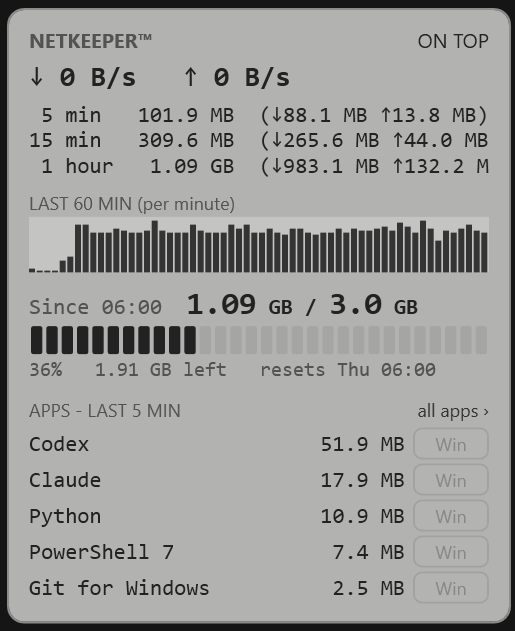
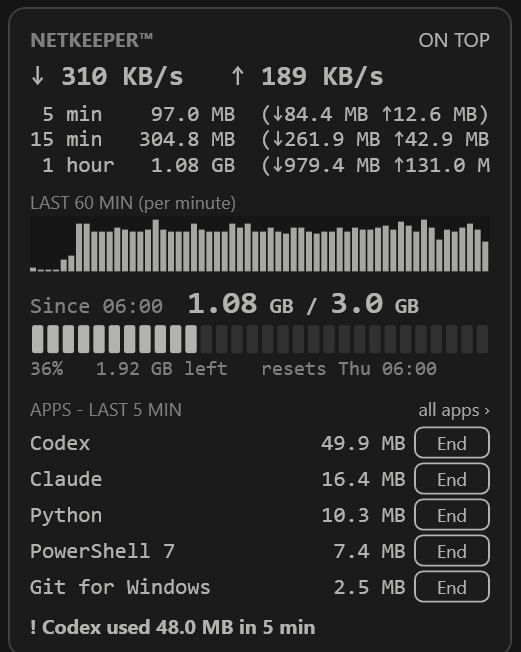
The small window that sits on your desktop. Your speed right now, the last hour, and your allowance as a counted bar.

  • Speed, the last 5 minutes, 15 minutes and hour
  • The last 60 minutes, one bar per minute
  • Top apps right now, with an End button
The NETKEEPER desktop widget in black and white: 1.09 GB of 3.0 GB used since 06:00, the last 60 minutes, and the top apps
E-inkBlack and white. Status is shown by counted bars, never colour alone.
The NETKEEPER desktop widget in colour: live speed, 1.08 GB of 3.0 GB used since 06:00, top apps and a warning for one app
ColourDark, with a warning line when one app pulls a lot.
02 · PC

Dashboard

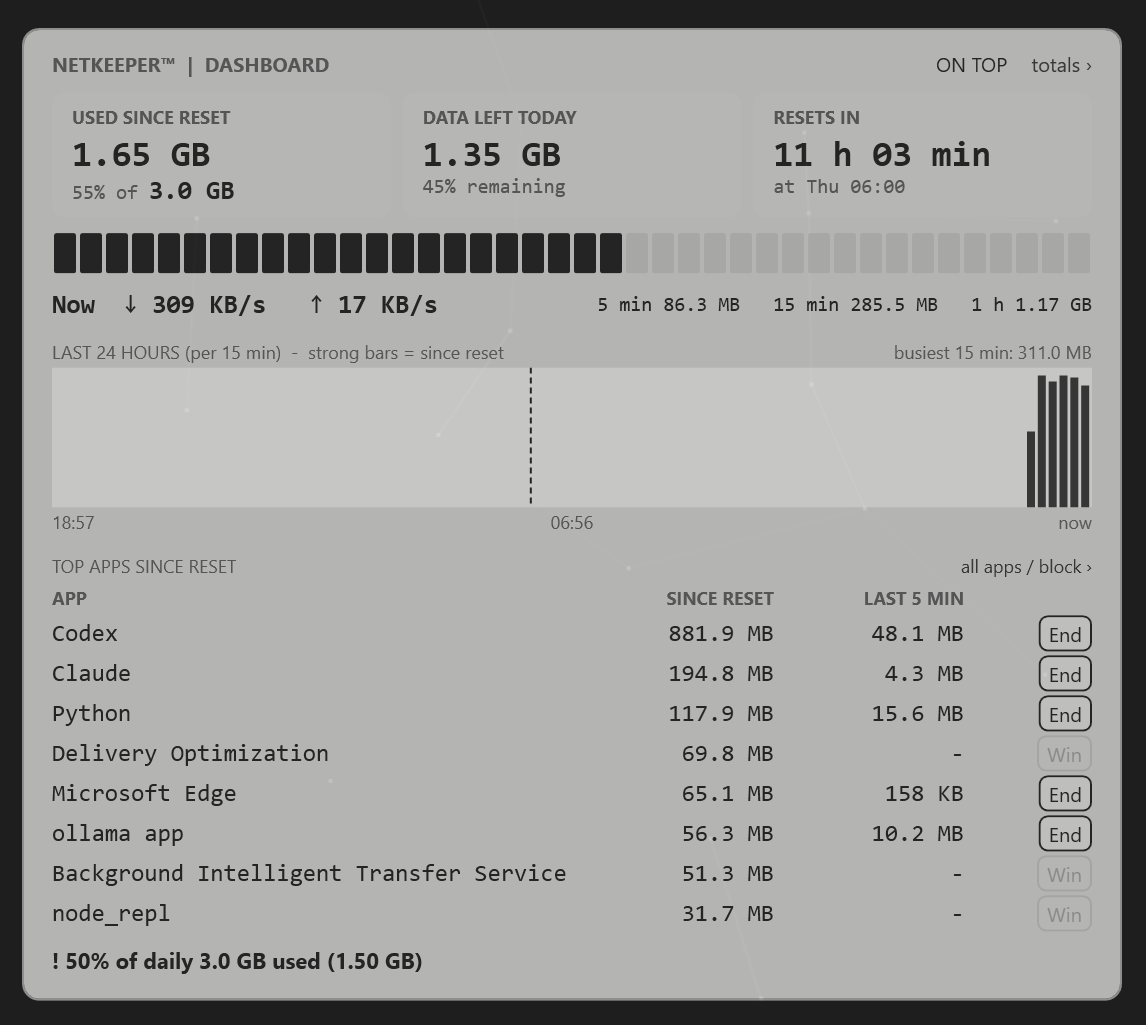
The whole day on one screen. How much you have used, how much is left, and how long until it starts again.

  • Used since reset, data left, time to reset
  • The last 24 hours, with the reset marked
  • Top apps, each with an End button
Dashboard view: 1.65 GB used since reset, 1.35 GB left today, the last 24 hours and the top apps with End buttons
03 · PC

Totals

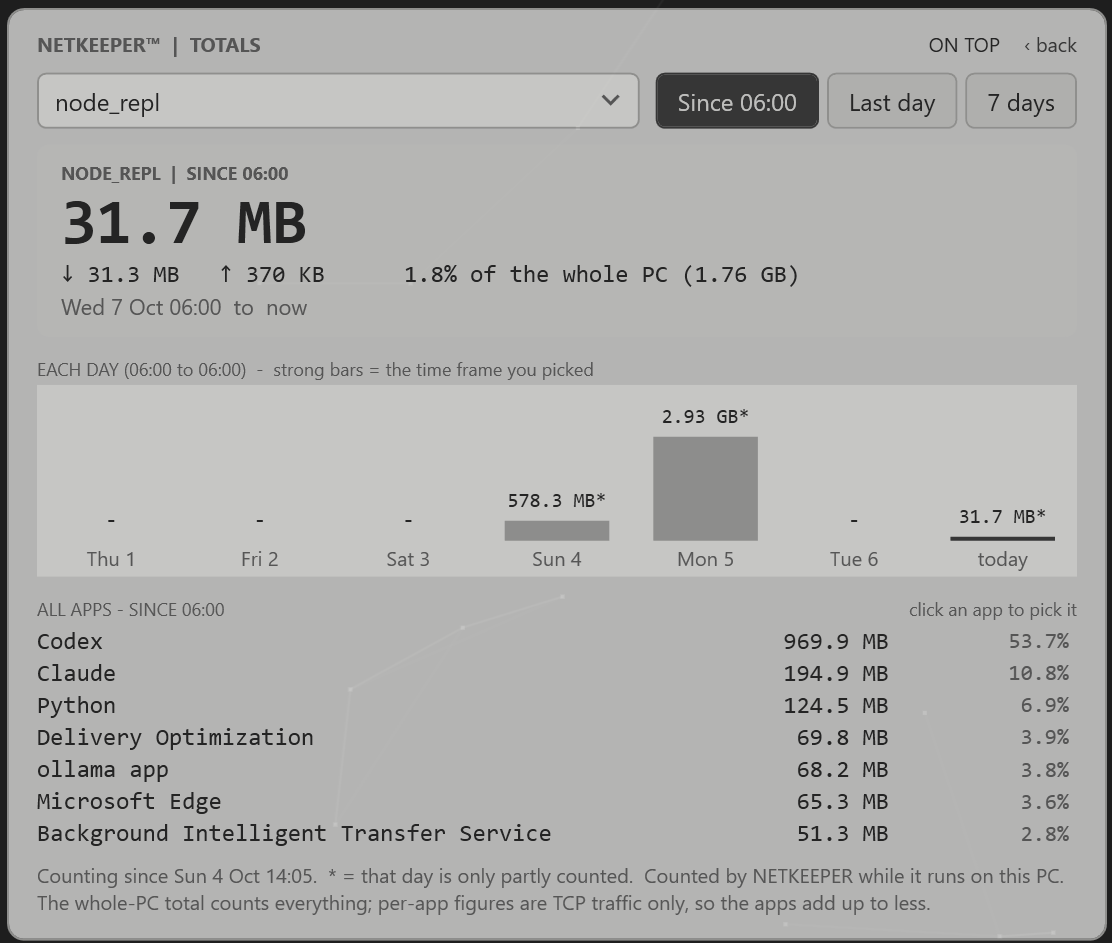
Pick one app, or the whole PC, and see what it used. Since the reset, over the last day, or across a week.

  • Each day as a bar, so one heavy day stands out
  • Every app ranked, with its share
  • Click an app in the list to look closer
Totals view: one app's use since reset, each day of the last week, and all apps ranked
04 · PC

Simple

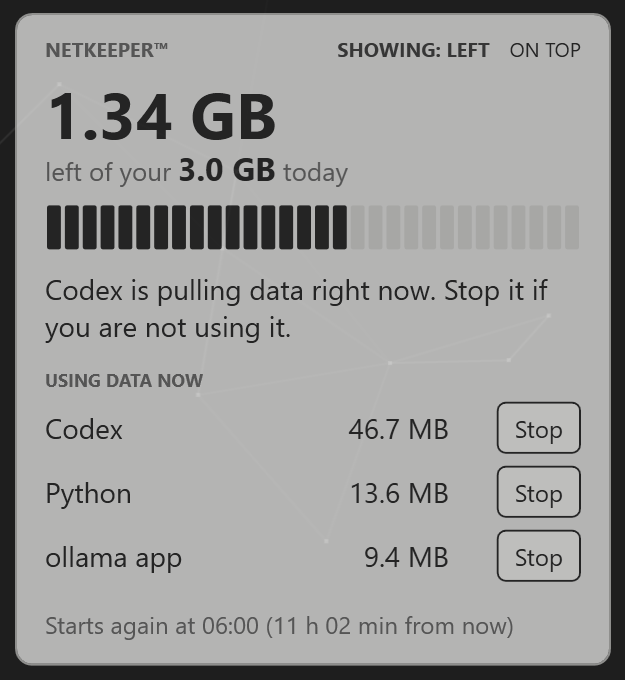
One big number: what is left today. Under it, whoever is using data right now, and a button to stop it.

  • Plain words, no charts
  • A Stop button next to each app
  • When your day starts again
Simple view: 1.34 GB left of your 3.0 GB today, with the apps using data now and Stop buttons
05 · PC

Bar

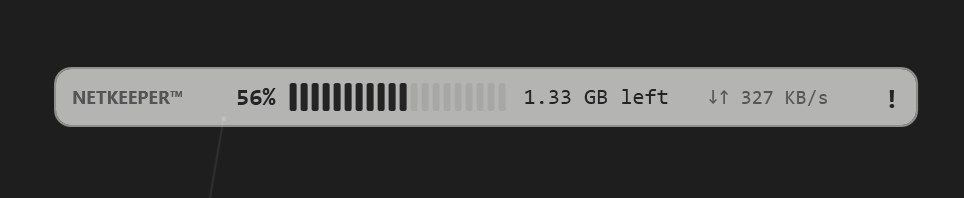
One thin line on the edge of your screen. Percent used, data left and your speed, always in view.

  • Hover for the full figures
  • An exclamation mark when something needs attention
  • Right-click for the other views and settings
Bar view: 56% used, 1.33 GB left and the current speed on one thin line
Always thereOne thin line on the edge of your screen.
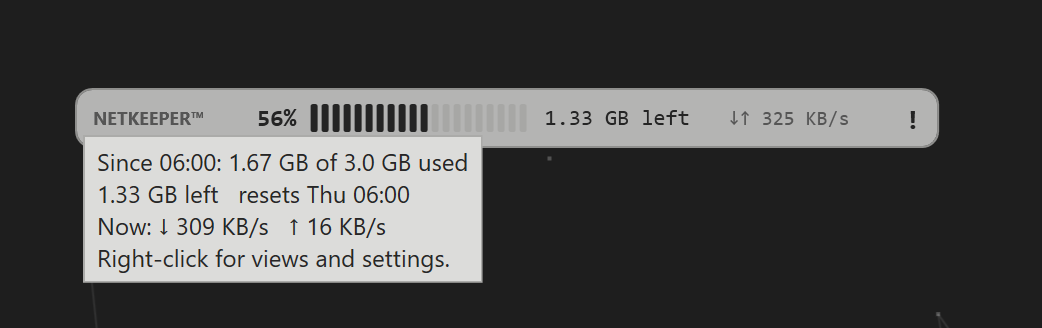
Bar view with a hover note giving the full figures: 1.67 GB of 3.0 GB used, 1.33 GB left, speed now
Hover for the detailThe full figures appear in a small note.
06 · Android

On your phone

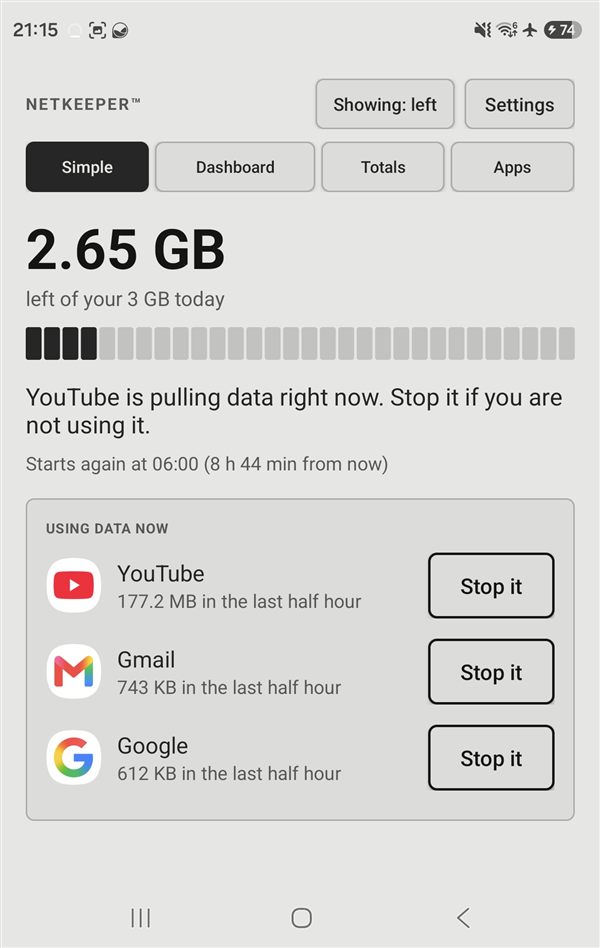
Your data left today in one big number, the apps using it right now, and a quick way to stop the ones you can.

  • The same views as the PC: Simple, Dashboard, Totals and Apps
  • Three looks like the PC: E-ink, E-ink inverted or colour
  • A safe-to-stop hint beside each app
  • Warnings at 50, 75, 90 and 100%
  • The logo in your top bar fills up like a gauge as the day's data is used

The Android app is in early testing. These are real screenshots from a phone, with real numbers.

Android Simple view in the E-ink look: 2.65 GB left of your 3 GB today, a counted bar, and the apps using data with Stop it buttons
SimpleWhat is left, and who is using data.
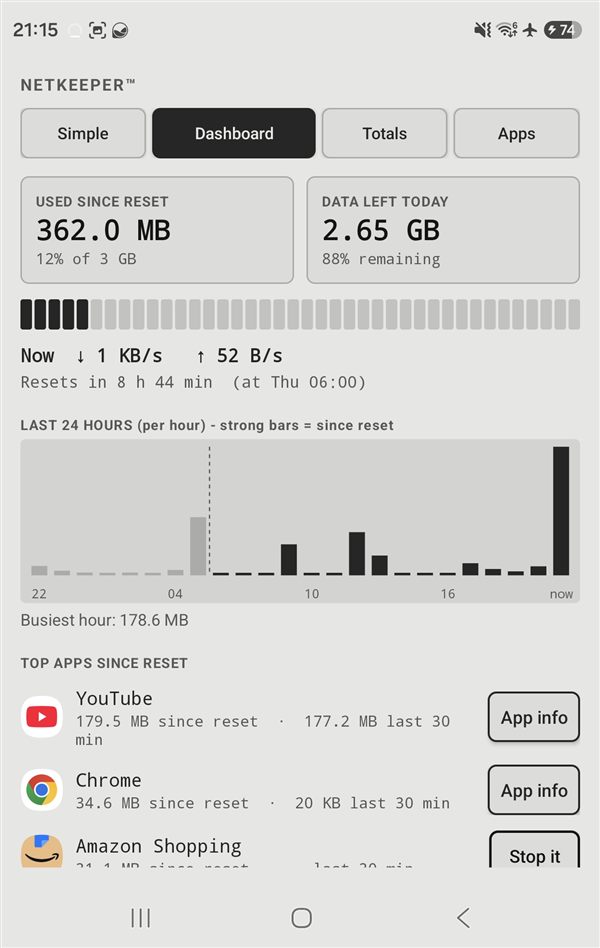
Android Dashboard view: used and left today, the last 24 hours as bars, and the top apps since the reset
DashboardThe whole day on one screen.
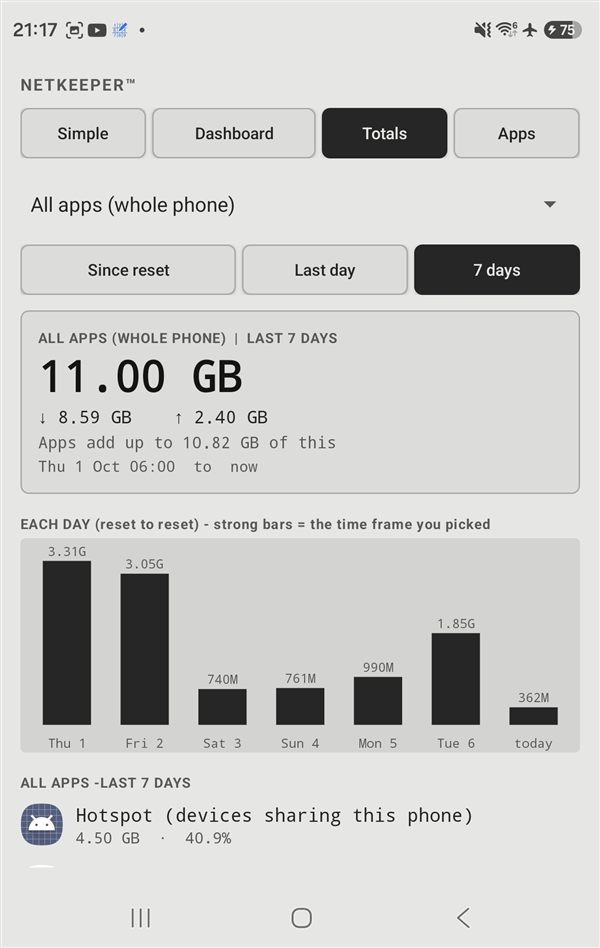
Android Totals view: 11 GB over 7 days, a bar for each day and every app ranked
TotalsAny app, any day, last week.

How it works

Crews on offshore installations often share a small daily allowance, for example 3 GB per 24 hours that starts again at 06:00. Updaters, backups and auto-downloads quietly use it up. NETKEEPER keeps watch.

See what you used

Your data since the daily reset, against your own limit.

See which apps

A simple list of the apps that used the data, and when. Just MB and GB.

Always in view

Your usage, your speed right now and the apps using data are always on screen, updating as you go.

Warned on top

Extra alerts at 50%, 75%, 90% and 100% of your day, and when one app suddenly pulls a lot.

Quiet by design

No account, no tracking. Status is never shown by colour alone.

Per-app figures on Windows need NETKEEPER to run as administrator.

Download NETKEEPER

Pick your device. Both downloads are small.

Windows

Download for Windows Version 5.1 · .zip · 43 KB · Windows 10 and 11
  1. Unzip the file anywhere.
  2. Double-click Start-NETKEEPER.vbs.
  3. For per-app figures, allow it to run as administrator.
Windows may show a SmartScreen warning because it is a script: choose More info, then Run anyway.

Android

Download for Android Version 5.1 early test · .apk · 105 KB
  1. Open the downloaded file.
  2. When Android asks, allow installs from your browser.
  3. Open NETKEEPER and answer the short setup questions.
This is an early version that does not come from the Play Store, so Android may ask you to allow the install. If you tried an earlier test version, uninstall it first.

Share NETKEEPER

Pass it to the person next to you. When everyone shares one small allowance, the best way is the one that uses none of it.

Get in touch

Questions, problems or ideas. A real person reads every email at team@realmsseed.ai.

Report a bug

Something broke or looks wrong? Tell us what you were doing.

Report a bug

Sales and teams

Using NETKEEPER on a vessel, site or crew? Ask about setting it up for a group.

Sales enquiry

Anything else

Ideas, feedback, press, or just a question.

Send an email

These buttons open your own email app. Nothing is sent to us until you press send, and the site stores nothing about you.